


Als Ingenieure für LED-Anzeigetechnologie, Wir verstehen, dass Probleme wie Bildschirm flackert, teilweiser Blackout, Und Fehlfunktion des Bildschirms können sich direkt auf Ihren Geschäftsbetrieb und Ihren ROI auswirken. Dieser Leitfaden konzentriert sich auf wesentliche Themen wie z Anomalien der Stromversorgung, Signalübertragungsfehler, Und Treiber-IC-Fehler, Bereitstellung eines vollständigen Fehlerbehebungsprozesses von schnellen Selbstprüfungen bis hin zur Optimierung auf technischem Niveau – speziell für die Szenarien und Abfragegewohnheiten ausländischer Benutzer konzipiert.
1. Kernfehlerlogik: 3 Schritte zur Lokalisierung der Grundursache
Das Wesen von LED-Anzeigefehlern kann in drei Hauptbereiche eingeteilt werden: Stromversorgung, Signalübertragung, Und Anzeigeeinheiten. Jedes entspricht unterschiedlichen Symptomen für eine schnelle Lokalisierung:
| Fehlertyp | Häufige Ursachen | Typische Symptome | Auswirkungsstufe |
|---|---|---|---|
| Stromversorgung | Instabilität der Treiberleistung (schwankende Spannung/Strom), Hauptnetzteil defekt (Schwankungen des AC-Eingangs) | Module leuchten nicht, periodisches Flackern, Gesamthelligkeitsschwankung | Global / Teilweise |
| Signalproblem | Fehler im Netzwerk/optischen Kabel, fehlerhafte Steuerkarten (Sender/Empfänger), Konfigurationsfehler | Teilweise Fehlfunktion, keine Inhaltsaktualisierung, völliger Blackout, statisches Rauschen | Global / Teilweise |
| Hardware | Fehler im Modultreiber-IC, LED-Perle kurz/tot, schlechte Kühlung | Horizontale/vertikale Streifen, isolierte schwarze Punkte, teilweise Verfärbung, automatische Abschaltung | Lokal – Ausbreitungsgefahr |

Anschlussdiagramm des LED-Moduls
2. Szenariobasierte Fehlerbehebung: Symptom → Selbsttest → Lösung
2.1. Flackernder Bildschirm: Hauptursache sind Signal oder Stromversorgung
Flimmern ist ein klassisches Zeichen für Spannungs-/Signalinstabilität. Befolgen Sie diese Schritte: 80% der Probleme werden schnell gelöst:
-
Regelmäßiges periodisches Flackern: Verwenden Sie ein Multimeter, um die Stromversorgung des Treibers zu überprüfen (DC 5V oder 4,2V) Ausgabe. Quellen von schlechter Qualität schwanken unter Last – ersetzen Sie sie direkt durch ein seriöses, redundantes Netzteil (Z.B., Es ist gut gemeint).
-
Lokales/einzelnes Schrankflackern: Stecken Sie das Flackermodul in einen nahegelegenen Empfängerkartenanschluss. Wenn das Flackern verschwindet, Die ursprüngliche Empfängerkarte ist ausgefallen – ersetzen Sie sie durch dasselbe Modell.
-
Zufälliges Flimmern im Vollbildmodus: Überprüfen Sie die Stabilität der Wechselstrom-Netzspannung. Schwankungen über ±10 % erfordern einen Stabilisator in Industriequalität, um eine Überlastung der Stromversorgung zu verhindern.
2.2. Kein Licht/teilweise Verdunkelung: Überprüfen Sie die Stromversorgung vor dem Signal
Die meisten Fälle stammen aus “Stromausfall” oder “Signalverlust”. Eine priorisierte Fehlerbehebung ist effizienter:
-
Ein Modul/Reihe weg: Konzentrieren Sie sich auf Modulstrom-/Datenbandkabel. Vertauschtes Einsetzen oder Lockerheit kommt häufig vor – setzen Sie es erneut ein und bestätigen Sie die sichere Verriegelung.
-
Verdunkelung des gesamten Bildschirms/einzelnen Schranks: Überprüfen Sie die Stromversorgungsanzeige des Treibers – wenn sie nicht leuchtet, Ersetzen Sie die Stromversorgung. Wenn die Anzeige leuchtet, aber der Bildschirm ausgeschaltet ist, Möglicherweise handelt es sich um einen Überlastungsschutz: Neustart nach Trennung, Überprüfen Sie dann die Belastung.
-
Betriebsanzeige an, Bildschirm aus: Tauschen Sie das Sender-Empfänger-Netzwerkkabel aus. Wenn unverändert, Überprüfen Sie die Konfiguration der Steuerkarte (Auflösung, Modulanzahl), und laden Sie die Konfigurationsdatei neu.
2.3. Fehlfunktion/verstümmelte Ausgabe/Farbfehler: Daten- oder IC-Probleme
Dabei handelt es sich meist um Datenketten- oder Gerätefehler – mit denen Sie sie schnell lokalisieren können “Swap-Tests”:
-
Horizontale Streifen/Farbfehler: Tauschen Sie das defekte Modul gegen ein normales aus. Wenn sich der Fehler verschiebt, Es ist der Modultreiber-IC oder die Leiterplatte; wenn nicht, Empfängerkarte oder Datenkette prüfen.
-
Teilweise Nichtübereinstimmung von Farbe und Helligkeit: Stellen Sie sicher, dass die Empfängerkarte richtig geladen wurde (Scanmodus, Treiber-IC-Typ, usw.); Eine Nichtübereinstimmung der Parameter führt zu schwerwiegenden visuellen Problemen – konfigurieren Sie sie gemäß der Anleitung des Displays neu.

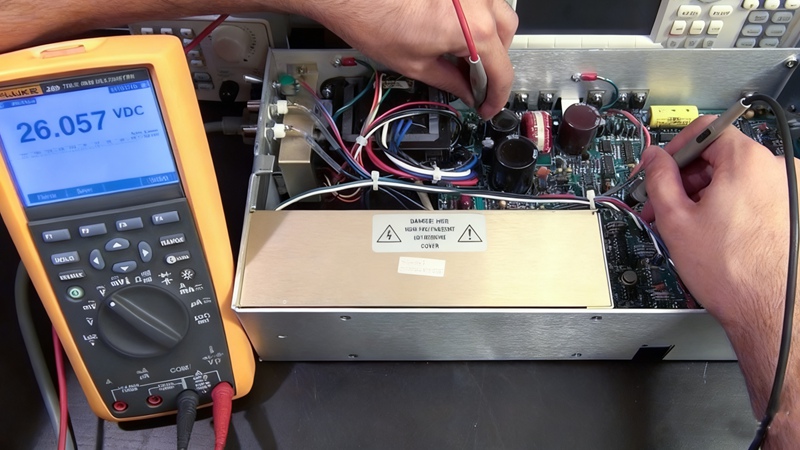
Reparatur von LED-Modulen
3. Optimierung auf technischem Niveau: Projekte mit hohem Budget ($500,000+)
Für große Projekte, Bei der Fehlerbehebung müssen sowohl schnelle Lösungen als auch Lösungen zum Einsatz kommen systematische Risikominderung:
3.1. Beschaffungsprävention:
-
Stromversorgung: Verwenden Sie immer N+1-Redundanz, um Ausfallzeiten im gesamten Bildschirm zu vermeiden.
-
Treiber-IC: Wählen Sie Modelle mit einer Bildwiederholfrequenz ≥3840 Hz, um Spannungs-/Stromschwankungen widerstandsfähig zu machen.
-
Außenbildschirme: Muss für anspruchsvolle Wetterbedingungen und Umgebungen IP65/IP66-zertifiziert sein.
3.2. Toolkit für die Wartung vor Ort:
-
Multimeter zur Spannungs-/Stromprüfung, Ersatzmodule/Empfängerkarten für schnelle Austauschtests.
-
Infrarot-Thermometer zur Überwachung der Gehäusetemperatur; wenn über 60°C, Entlüftungsöffnungen löschen oder Lüfter hinzufügen.
-
Sichern Sie die Konfigurationsdateien der Steuerkarte, um eine schnelle Wiederherstellung nach einer Fehlfunktion oder einem unleserlichen Bildschirm zu ermöglichen.
4. Häufig gestellte Fragen zu Hochfrequenz
Q1: Die Stromversorgungsanzeige leuchtet, aber es wird kein Bild angezeigt – ist das Steuerungssystem defekt??
A: Normalerweise ein Signalproblem. Netzwerkkabel zwischen Sender/Empfänger prüfen (Anzeigelampe), und stellen Sie sicher, dass der Sender die Bildschirmauflösung und die Anzahl der Empfänger erkennt.
Q2: Der Bildschirm wurde plötzlich schwarz – was zuerst überprüft werden sollte?
A: Überprüfen Sie immer zuerst die primäre Wechselstromversorgung (Auslösung des Leistungsschalters, usw.), nicht das Kontrollsystem. Nach Bestätigung von AC, Überprüfen Sie die Links/Anzeige der Absenderkarte, bevor Sie das Gerät öffnen.
Q3: So unterscheiden Sie zwischen Modul- und Steuerungssystemproblemen?
A: Nutzen Sie den „Swap-Test“: Tauschen Sie ein verdächtiges Modul gegen ein normales aus. Wenn sich der Fehler verschiebt, Es ist das Modul; wenn es bleibt, Wahrscheinlich liegt der Fehler bei der Empfängerkarte/dem Datenkabel.
Q4: Langfristig, wie man Ausfälle reduziert?
A: Regelmäßige Wartung und ordnungsgemäße Verwendung: Entlüftungsöffnungen jährlich reinigen, vermeiden 100% Helligkeit über längere Zeiträume, Verwenden Sie eine sichere Helligkeit gemäß den Markenspezifikationen. Für Außenbildschirme, Überprüfen Sie die Dichtungen vierteljährlich.
F5: Geschätzte Kosten für den Teileaustausch?
A: Stromversorgung: $50–200 $/Einheit; Empfängerkarte: $100–300 $; Netzwerkkabel: $10–30 $/m; Module: $200– 500 $/Panel; Absenderkarte: $300–800 $. Markenprodukte sind kostengünstiger/länger haltbar.
5. Abschluss: Professioneller Support & Langzeitgarantie
LED-Anzeigen sind hochpräzise elektronische Systeme. Für komplexe Fehler (Z.B., Großflächiger IC-Ausfall, Mainboard kurz), Wenden Sie sich immer an Ihren Händler oder einen Fachmann. Wir bieten sowohl hochwertige LED-Produkte als auch 24/7 technischer Support und Wartungspakete – von der Auswahl über die Installation bis zum After-Sales. Für individuelle Fehlerbehebung oder Ersatzteilempfehlungen, Kontaktieren Sie uns für einen persönlichen Service.
