


Como ingenieros de tecnología de pantallas LED, entendemos que cuestiones como pantalla parpadeando, apagón parcial, y mal funcionamiento de la pantalla puede impactar directamente sus operaciones comerciales y el ROI. Esta guía se centra en cuestiones esenciales como anomalías en el suministro de energía, errores de transmisión de señal, y fallas del controlador IC, proporcionando un proceso completo de solución de problemas, desde autoverificaciones rápidas hasta optimización de nivel de ingeniería, especialmente diseñado para escenarios y hábitos de consulta de usuarios extranjeros..
1. Lógica de falla central: 3 Etapas para identificar la causa raíz
La esencia de las fallas de las pantallas LED se puede clasificar en tres áreas principales: Fuente de alimentación, Transmisión de señal, y Unidades de visualización. Cada uno corresponde a síntomas distintos para una rápida localización.:
| Tipo de falla | Causas comunes | Síntomas típicos | Nivel de impacto |
|---|---|---|---|
| Fuente de alimentación | Inestabilidad de la potencia del conductor (voltaje/corriente fluctuante), fuente de alimentación principal defectuosa (Fluctuaciones de entrada de CA) | Los módulos no iluminan, parpadeo periódico, fluctuación general del brillo | Global / Parcial |
| Problema de señal | Fallo de red/cable óptico, tarjetas de control defectuosas (remitente/receptor), errores de configuración | Mal funcionamiento parcial, sin actualización de contenido, apagón total, ruido estático | Global / Parcial |
| Hardware | Fallo del IC del controlador del módulo, Cuenta LED corta/muerta, mal enfriamiento | Rayas horizontales/verticales, puntos negros aislados, decoloración parcial, apagado automático | Local: riesgo de propagación |

Diagrama de conexión del módulo LED
2. Solución de problemas basada en escenarios: Síntoma → Autocomprobación → Solución
2.1. Pantalla parpadeante: La señal o la fuente de alimentación son los principales culpables
El parpadeo es un signo clásico de inestabilidad de voltaje/señal.. Siga estos pasos - 80% de los problemas se resuelven rápidamente:
-
Parpadeo periódico regular: Utilice un multímetro para comprobar la fuente de alimentación del controlador (CC 5 V o 4,2 V) producción. Las fuentes de mala calidad fluctúan bajo carga: reemplácelas directamente con una fuente de alimentación redundante de buena reputación (P.EJ., Buenas intenciones).
-
Parpadeo local/de un solo gabinete: Conecte el módulo parpadeante a un puerto de tarjeta receptora cercano. Si el parpadeo desaparece, la tarjeta receptora original ha fallado; reemplácela con el mismo modelo.
-
Parpadeo aleatorio en pantalla completa: Verifique la estabilidad del voltaje de la red eléctrica de CA.. Las fluctuaciones que superan el ±10% requieren un estabilizador de grado industrial para evitar la sobrecarga del suministro de energía..
2.2. Sin luz/apagón parcial: Verifique la energía antes de la señal
La mayoría de los casos provienen de “corte de corriente” o “pérdida de señal”. La resolución de problemas priorizada es más eficiente:
-
Un módulo/fila de descuento: Centrarse en los cables planos de alimentación/datos del módulo. La inserción inversa o la holgura son comunes: vuelva a colocar y confirme el bloqueo seguro.
-
Apagón de pantalla completa/gabinete individual: Verifique el indicador de fuente de alimentación del controlador (si está apagado), reemplazar el poder. Si el indicador está encendido pero la pantalla está apagada, puede ser protección contra sobrecarga de energía: reiniciar después de desconectar, luego verifique la carga.
-
Indicador de encendido encendido, pantalla apagada: Cambie el cable de red del remitente al receptor. Si no cambia, verificar la configuración de la tarjeta de control (resolución, recuento de módulos), y recargar el archivo de configuración.
2.3. Mal funcionamiento/Salida confusa/Error de color: Problemas de datos o IC
En su mayoría se trata de fallos en la cadena de datos o en la unidad; identifíquelos rápidamente utilizando “prueba de intercambio”:
-
Rayas horizontales/errores de color: Cambie el módulo que funciona mal por uno normal.. Si la falla se mueve, es el controlador del módulo IC o PCB; si no, comprobar la tarjeta del receptor o la cadena de datos.
-
Discrepancia parcial de color/brillo: Asegúrese de que la tarjeta receptora se haya cargado correctamente (modo de escaneo, tipo de controlador IC, etc.); La falta de coincidencia de parámetros causa problemas visuales graves: reconfigure según el manual de la pantalla.

Reparación del módulo LED
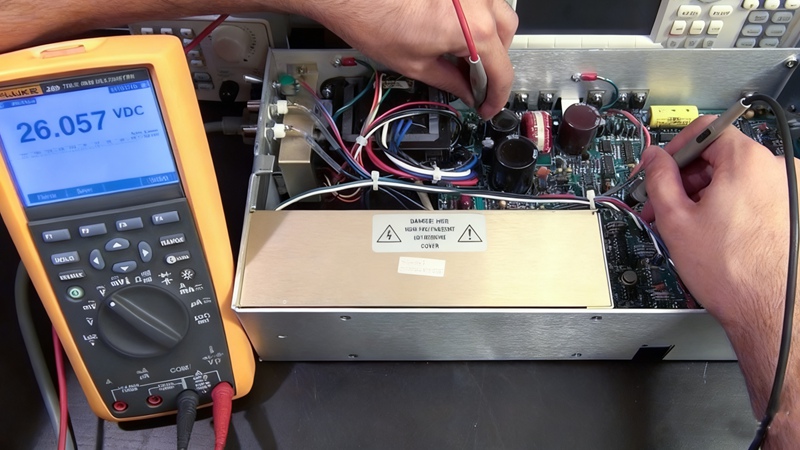
3. Optimización de grado de ingeniería: Proyectos de alto presupuesto ($500,000+)
Para grandes proyectos, La solución de problemas debe abordar tanto soluciones rápidas como reducción sistemática del riesgo:
3.1. Prevención de adquisiciones:
-
Fuente de alimentación: Utilice siempre la redundancia N+1 para evitar el tiempo de inactividad de la pantalla completa.
-
Controlador IC: Elija modelos con frecuencia de actualización ≥3840Hz para resistencia a las fluctuaciones de voltaje/corriente.
-
Mamparas exteriores: Debe tener clasificación IP65/IP66 para condiciones climáticas y entornos desafiantes.
3.2. Kit de herramientas de mantenimiento in situ:
-
Multímetro para comprobaciones de tensión/corriente., módulos de repuesto/tarjetas receptoras para pruebas de intercambio rápido.
-
Termómetro infrarrojo para controlar la temperatura del chasis; si supera los 60°C, Limpiar las rejillas de ventilación o agregar ventiladores..
-
Mantenga una copia de seguridad de los archivos de configuración de la tarjeta de control para una recuperación rápida en caso de mal funcionamiento o pantalla confusa..
4. Preguntas frecuentes sobre alta frecuencia
Q1: El indicador de suministro de energía está encendido pero no hay imagen: ¿está averiado el sistema de control??
A: Generalmente es un problema de señal. Verifique el cable de red entre el remitente y el receptor (lámpara indicadora), y asegúrese de que el remitente reconozca la resolución de la pantalla y el recuento de receptores.
Q2: La pantalla se puso negra de repente: qué comprobar primero?
A: Siempre verifique primero la fuente de alimentación de CA primaria (disparo del disyuntor, etc.), no el sistema de control. Después de confirmar AC, verifique los enlaces/indicadores de la tarjeta del remitente antes de abrir el dispositivo.
Q3: Cómo distinguir entre un problema de módulo y de sistema de control?
A: Utilice la "prueba de intercambio": Cambie un módulo sospechoso por uno normal. Si la falla se mueve, es el modulo; si se queda, Es probable que la tarjeta receptora/cable de datos tenga la culpa.
Q4: A largo plazo, cómo reducir las fallas?
A: Mantenimiento regular y uso adecuado.: Limpie los puertos de ventilación anualmente, evitar 100% brillo durante largos períodos, use brillo seguro según las especificaciones de la marca. Para mamparas de exterior, comprobar los sellos trimestralmente.
Q5: Costo estimado de reemplazo de piezas?
A: Fuente de alimentación: $50–$200/unidad; tarjeta receptora: $100–$300; cable de red: $10–$30/mes; módulos: $200–$500/panel; tarjeta de remitente: $300–$800. Los productos de marca son más rentables y duraderos..
5. Conclusión: Soporte profesional & Garantía a largo plazo
Las pantallas LED son sistemas electrónicos de alta precisión. Para fallas complejas (P.EJ., falla de circuito integrado a gran escala, placa base corta), contacte siempre con su proveedor o con un profesional. Ofrecemos productos LED de alta calidad y 24/7 Paquetes de soporte técnico y mantenimiento: desde la selección hasta la instalación y el servicio posventa.. Para solución de problemas personalizada o recomendaciones de piezas de repuesto, contáctenos para un servicio personalizado.
