


Как инженеры по технологиям светодиодных дисплеев, we understand that issues like экран мерцает, частичное затемнение, и screen malfunction can directly impact your business operations and ROI. This guide focuses on essential issues such as power supply anomalies, signal transmission errors, и driver IC failures, providing a full troubleshooting process from quick self-checks to engineering-grade optimization — especially designed for overseas users’ scenarios and query habits.
1. Core Fault Logic: 3 Stages to Pinpoint the Root Cause
The essence of LED display faults can be categorized into three main areas: Источник питания, Signal Transmission, и Display Units. Each corresponds to distinct symptoms for quick localization:
| Fault Type | Common Causes | Typical Symptoms | Impact Level |
|---|---|---|---|
| Источник питания | Driver power instability (fluctuating voltage/current), faulty main PSU (AC input fluctuations) | Modules not lighting, periodic flickering, overall brightness fluctuation | Global / Partial |
| Signal Issue | Network/optical cable failure, faulty control cards (sender/receiver), configuration errors | Partial malfunction, no content update, полное затемнение, static noise | Global / Partial |
| Hardware | Module driver IC failure, LED bead short/dead, poor cooling | Horizontal/vertical stripes, isolated black dots, partial discoloration, auto shut-off | Local–risk of spreading |

Схема подключения светодиодного модуля
2. Scenario-Based Troubleshooting: Symptom → Self-Check → Solution
2.1. Flickering Screen: Signal or Power Supply Are Main Culprits
Flicker is a classic sign of voltage/signal instability. Follow these steps — 80% of issues resolve quickly:
-
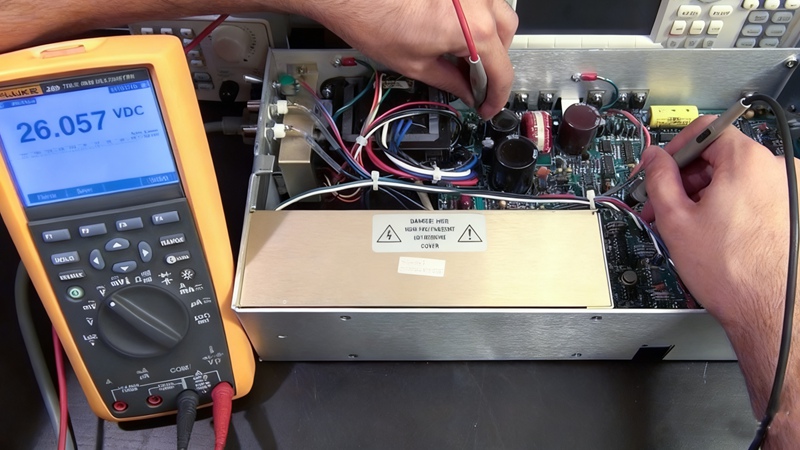
Regular periodic flicker: Use a multimeter to check driver power supply (DC 5V or 4.2V) выход. Poor-quality sources fluctuate under load — directly replace with a reputable redundant PSU (например, Mean Well).
-
Local/single-cabinet flicker: Plug the flickering module into a nearby receiver card port. If flicker disappears, the original receiver card has failed — replace with the same model.
-
Full-screen random flicker: Check stability of AC mains voltage. Fluctuations exceeding ±10% require an industrial-grade stabilizer to prevent power supply overload.
2.2. No Light/Partial Blackout: Check Power Before Signal
Most cases stem from “power cut” или “signal loss”. Prioritized troubleshooting is more efficient:
-
One module/row off: Focus on module power/data ribbon cables. Reverse insertion or looseness is common — reseat and confirm secure locking.
-
Entire screen/single cabinet blackout: Check driver power supply indicator — if unlit, replace the power. If indicator is on but screen is out, it may be power overload protection: restart after disconnect, then check load.
-
Power indicator on, screen off: Swap the sender-to-receiver network cable. If unchanged, verify control card configuration (разрешение, module count), and reload the config file.
2.3. Malfunction/Garbled Output/Color Error: Data or IC Issues
These are mostly data chain or unit faults — pinpoint quickly using “swap testing”:
-
Horizontal stripes/color errors: Swap the malfunctioning module with a normal one. If the fault moves, it’s the module driver IC or PCB; if not, check receiver card or data chain.
-
Partial color/brightness mismatch: Ensure the receiver card has correctly loaded (scan mode, driver IC type, и т. д.); parameter mismatch causes severe visual issues — reconfigure per display manual.

LED Module Repair
3. Engineering-Grade Optimization: High-Budget Projects ($500,000+)
For large projects, troubleshooting must address both rapid fixes and systematic risk reduction:
3.1. Procurement Prevention:
-
Power supply: Always use N+1 redundancy to avoid full-screen downtime.
-
Драйвер IC: Choose models with refresh rate ≥3840Hz for voltage/current fluctuation resilience.
-
Уличные экраны: Must be IP65/IP66-rated for challenging weather and environments.
3.2. On-Site Maintenance Toolkit:
-
Multimeter for voltage/current checks, spare modules/receiver cards for rapid swap testing.
-
Infrared thermometer to monitor chassis temperature; if over 60°C, clear vents or add fans.
-
Keep control card config files backed up for fast recovery from malfunction/garbled screen.
4. High-Frequency FAQ
Q1: Power supply indicator is on but no image — is the control system broken?
А: Usually a signal issue. Check network cable between sender/receiver (indicator lamp), and make sure the sender recognizes display resolution and receiver count.
Q2: Screen went black suddenly — what to check first?
А: Always check primary AC power supply first (circuit breaker trip, и т. д.), not the control system. After confirming AC, check sender card links/indicator before opening the device.
Q3: How to distinguish between module vs control system problem?
А: Use the “swap test”: Exchange a suspected module with a normal one. If the fault moves, it’s the module; if it stays, the receiver card/data cable is likely at fault.
Q4: Long-term, how to reduce failures?
А: Regular maintenance and proper use: Clean vent ports annually, avoid 100% brightness for long periods, use safe brightness as per brand specs. For outdoor screens, check seals quarterly.
Q5: Estimated part replacement cost?
А: Power supply: $50–$200/unit; receiver card: $100–$300; сетевой кабель: $10–$30/m; модули: $200–$500/panel; sender card: $300–$800. Branded products are more cost-effective/longer lasting.
5. Заключение: Professional Support & Long-Term Warranty
LED displays are high-precision electronic systems. For complex faults (например, large-scale IC failure, mainboard short), always contact your vendor or a professional. We provide both high-quality LED products and 24/7 technical support and maintenance packages — from selection to installation to after-sales. For personalized troubleshooting or spare part recommendations, contact us for one-to-one service.
